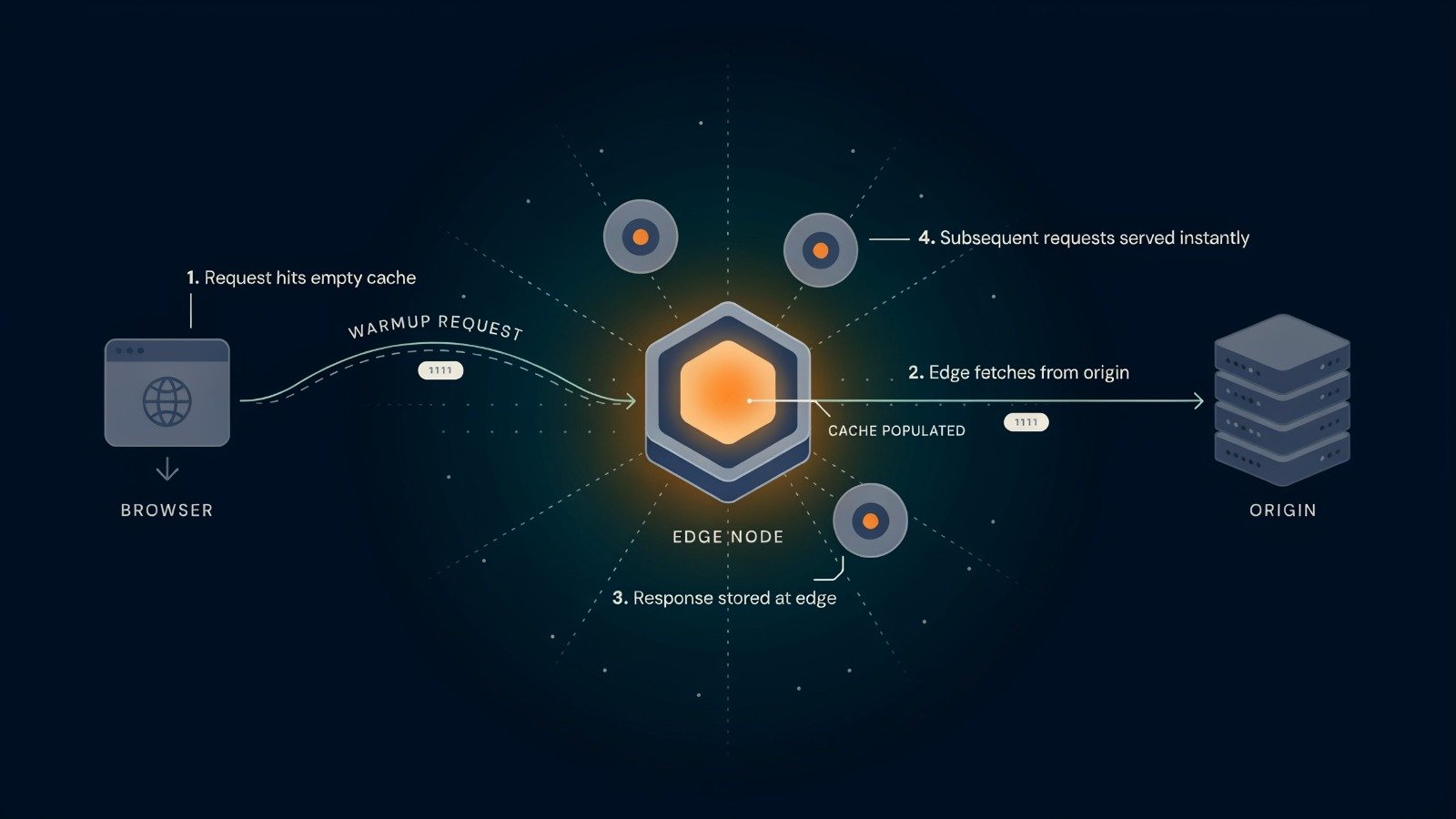
Quick answer: A warmup cache request is an automated HTTP request, or a key fetch for data caches, sent ahead of real users so the cache is already full when they arrive. It only works if the response is cacheable, the URL is one real visitors request, and you confirm a HIT afterward. Fire it after deploys, purges and expected traffic spikes.
Why Cold Caches Hurt More Than You Think
Cache warming means preloading content into one or more cache layers, including a CDN, reverse proxy, application cache or database page cache. Without it, the first visitor pays the price. In a CDN setup, the problem is multiplied, because CDNs such as Cloudflare, Fastly and Akamai run hundreds of independent edge caches, one per data center. A page cached in Frankfurt is still cold in Singapore, São Paulo and Sydney, and every deploy purges what was there.
Warming is not always necessary. It helps most when content is popular, cacheable and expensive to rebuild on a miss. One practical trigger is a p95 or p99 time-to-first-byte spike after deploys.
The Hotset-Gate-Verify Method (Original Framework)
Most guides stop at “send requests.” This method adds the two steps that decide whether the warming actually worked.
Step 1: Hotset — choose what to warm
Warming everything by default wastes origin capacity. Use production signals instead of guesses: count request frequency over a sliding window and take the top URLs. If your CDN supports stale-while-revalidate, you can shrink the warmup set to the truly critical hotset, because warming still helps tail latency.
Step 2: Gate — make sure the response can be stored
A warming request that returns an uncacheable response does nothing. Check that Cache-Control permits storage. Also watch Vary, since Vary mistakes silently dilute your warmup by caching a variant real visitors never request. A good spot check is to fetch the same URL with your warmup headers and again with a real browser’s headers, then compare the cache result.
Step 3: Verify — prove it was warm
A completed crawl is not the same as a warm cache. One cache-warming dashboard reports each response as HIT, MISS, EXPIRED, BYPASS or DYNAMIC specifically so teams don’t mistake a finished run for a warm edge. Track hit ratio per location, not just overall. Warming without monitoring hit rate or user latency means you are assuming the warmup helped.
Where to Send Warmup Requests
| Cache layer | What gets warmed | Watch out for |
|---|---|---|
| CDN edge | Public pages, assets per location | Each data center is separate, so one region warm does not mean all are |
| Reverse proxy or page cache | Rendered HTML | Preloaders here don’t warm the CDN |
| Application cache | Keys or query results | Needs fresh invalidation to avoid stale data |
| Database page cache | Frequently read pages | Needing heavy warming can signal slow cold reads |
That last row deserves attention. One analysis argues that needing aggressive warming suggests your primary database is too slow on cold reads. And in distributed environments with many cache nodes and data centers, coordinating consistent warmup is complex and often adds engineering overhead.
WordPress users should note a specific distinction. Page-cache preloaders and global CDN edge warming are different things, and a plugin that preloads your page cache does not necessarily warm Cloudflare or CloudFront edges.
A Safe Way to Send Them
Trigger warming right after deployment so the cache is hot before the first visitor arrives. Some teams do this with a CI step. Stage the run rather than firing requests from every point of presence at once. Start with a small canary warmup on the top URLs, then expand.
A minimal sketch looks like this. It reads a hotset file and throttles requests so the origin isn’t hammered. Add the same headers a real browser sends, such as Accept-Encoding, so you warm the variant visitors actually get:
bash
while read url; do
  curl -s -o /dev/null -H "Accept-Encoding: gzip, br" "$url"
  sleep 0.2
done < hotset.txt
Throttling matters in other systems too. One GraphQL router’s documentation exposes workers, items per second and an item delay as the three settings that shape warmup throughput, so warming can run alongside production traffic with predictable headroom.
Revalidation is the difference between a sustainable warmup and a bandwidth-heavy crawler. Prefer conditional requests where your setup supports them.
Common Mistakes
- Warming uncacheable pages. The response never gets stored.
- Warming from one location. Other edges stay cold.
- No measurement. Treat warming as an experiment with a before and after, not a feeling.
- Never refreshing the list. Combine warming with invalidation or refresh so stale entries don’t linger.
Warmup Checklist (Linkable Asset)
- Hotset built from real request frequency, not guesses
- Cache-Control allows storage on every warmed URL
- Vary behavior checked with browser-like headers
- Requests throttled and staged, not blasted from every location
- Warming triggered after deploys and purges
- HIT ratio measured per location before and after
- Warm list refreshed on a schedule
- Canary run completed before the full run
Guest Post Angles
These topics suit DevOps, performance and WordPress publications:
- Post-deploy cold start: why every purge resets your edge caches.
- WordPress preloader vs CDN warmer: which layer each one fixes.
- Cache warming ROI: how to measure TTFB and hit ratio changes.
Run One Canary Warmup After Your Next Deploy
Pick your ten most requested URLs and confirm they are cacheable. Then send a staged warmup cache request to each and check the cache status from at least two locations. If you see HITs everywhere, widen the hotset. If you see MISS or BYPASS, fix the headers before you add volume.



